Google Gemini में Photo कैसे बनाएं? aijobfuture की इस 2026 स्पेशल गाइड में जानें गूगल के ‘Nano Banana’ मॉडल से हाई-क्वालिटी इमेज जनरेट करने के 10 गुप्त तरीके।
मेरा Personal Experience: जब पहली बार मैंने Gemini से Photo बनाई
दोस्तों, honestly बताऊं तो मैं इसके बारे में कुछ नहीं जानता था। जब मेरे friend ने बताया कि Google Gemini me photo kaise banaye, तो मुझे विश्वास ही नहीं हुआ। लेकिन जब मैंने खुद try किया, मेरा mind सचमुच blow हो गया!
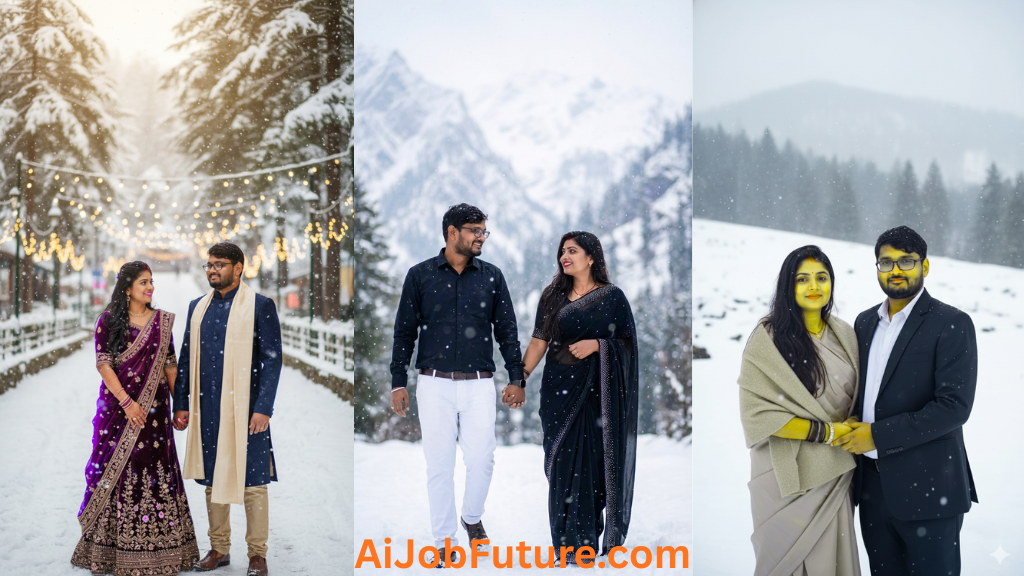
मेरी younger sister की engagement थी और मैं चाहता था कि कुछ pre-wedding photos create करूं जो सच में unique हों। पहली attempt में honestly काफी weird results आए। परंतु फिर मैंने सीखा कि proper तरीके से Google Gemini me photo kaise banaye, और यार, results देखकर मेरी sister की खुशी का ठिकाना नहीं रहा!
अगर आप भी AI से related interesting चीजें सीखना चाहते हैं, तो AiJobFuture.com को definitely visit करें। वहां आपको latest updates और practical tips मिलती हैं।
Google Gemini क्या है – Simple Language में समझें
देखो भाई, Google Gemini एक amazing AI tool है जो Google ने develop किया है। ये basically एक smart assistant है जो आपकी imagination को reality में convert कर देता है। जब आप कुछ describe करते हैं (जिसे हम prompt कहते हैं), तो Gemini उसे समझकर beautiful images create कर देता है।
असल में, technology काफी complex है – machine learning, neural networks, और बहुत कुछ। लेकिन आपको technical details की tension लेने की जरूरत नहीं। बस ये जानना important है कि Google Gemini me photo kaise banaye जो दिखने में professional लगें।
क्या पता आपको, लेकिन ये tool इतना powerful है कि आप wedding photos से लेकर festival celebrations, Shimla-Manali जैसी locations की stunning images, Happy New Year greetings – सब कुछ create कर सकते हैं! AiJobFuture.com पर आपको ऐसे ही mind-blowing AI tools की information मिलती है।
Step-by-Step Guide: Google Gemini me Photo Kaise Banaye
Step 1: Google Gemini को Access करना !
सबसे पहले तो अपने browser में Google Gemini की official website open करें। बेहद आसान है – अपने Google account से simply sign in कर लें। जैसे आप normally Gmail या YouTube use करते हैं, वैसे ही।
Step 2: Image Generation Feature को Activate करें !
Gemini के interface में आपको different options दिखेंगे। Image generation या Create Image का option select करें। कुछ versions में direct available होता है, कुछ में settings से enable करना पड़ता है।
Step 3: Reference Photo Upload करें (बेहद ज़रूरी!)
अगर आप चाहते हैं कि photo में आपका exactly वही face हो, तो ये step skip मत करना। एक high-quality, clear photo upload करें। मैंने प्रारंभ में इस step को ignore किया था और results बिल्कुल unexpected आए थे।
Step 4: Perfect Prompt Writing – Real Magic यहीं है!
अब आता है सबसे crucial part। Google Gemini me photo kaise banaye जो बिल्कुल आपकी expectations match करे? Answer है – detailed और specific prompt लिखना।
जितना ज्यादा detail आप देंगे, उतना better result मिलेगा। जैसे:
- Location mention करें (Shimla, Manali, Mumbai Marine Drive)
- Dress describe करें (red lehenga, blue sherwani, white gown)
- Mood बताएं (romantic, happy, emotional, festive)
- Time of day (morning golden hour, evening sunset, night lights)
Step 5: Generate करें और Patience रखें!
Generate/Enter button click करने के बाद 30 seconds से 2 minutes तक wait करना पड़ सकता है। First attempt में perfect नहीं मिला? Tension मत लो! Prompt में थोड़े changes करके फिर से try करो।
मुझे personally तो sometimes 4-5 attempts लगते हैं perfect result के लिए। लेकिन trust me, result देखकर सारी mehnat उचित लगती है।
Face Consistency – Same Face हर Photo में कैसे रखें!
ये ही सबसे बड़ा challenge है जब आप Google Gemini me photo kaise banaye सीख रहे हैं। मैंने काफी प्रयोग किया है और ये techniques actually काम करती हैं:
Technique 1: High-Quality Reference Image
- Front-facing, proper lighting वाली photo use करें
- Blurry या side angle की photo avoid करें
- Face clearly visible होना चाहिए
Technique 2: Detailed Face Description Prompt में specifically mention करें:
- “अपलोड किए गए चेहरे का हूबहू उपयोग करते हुए,”
- “संदर्भ छवि से चेहरे की विशेषताओं को बरकरार रखें,”
- “एक ही व्यक्ति, जिसकी शक्ल हमेशा एक जैसी रहती है”
Technique 3: Specific Features का Description जैसे: “एक युवा भारतीय महिला जिसका चेहरा oral है, गहरी भूरी आंखें हैं, मध्यम लंबाई के सीधे काले बाल हैं, गेहूं के रंग की त्वचा है और एक स्वाभाविक मुस्कान है।”
जानते हो क्या, ये सब मैंने trial and error से सीखा है। Initially तो हर photo में different face आ जाता था, frustrating था honestly। लेकिन अब मुझे 80-90% consistency मिल जाती है। AiJobFuture.com पर भी ऐसे advanced tips available हैं।
10 Powerful Prompts – अलग-अलग Occasions के लिए!
अब मैं आपको 10 ऐसे tested prompts share कर रहा हूँ जो मैंने personally use किए हैं। ये सब Indian context में हैं और different occasions cover करते हैं।
Prompt 1: Pre-Wedding Shoot – Shimla में Romantic Moment
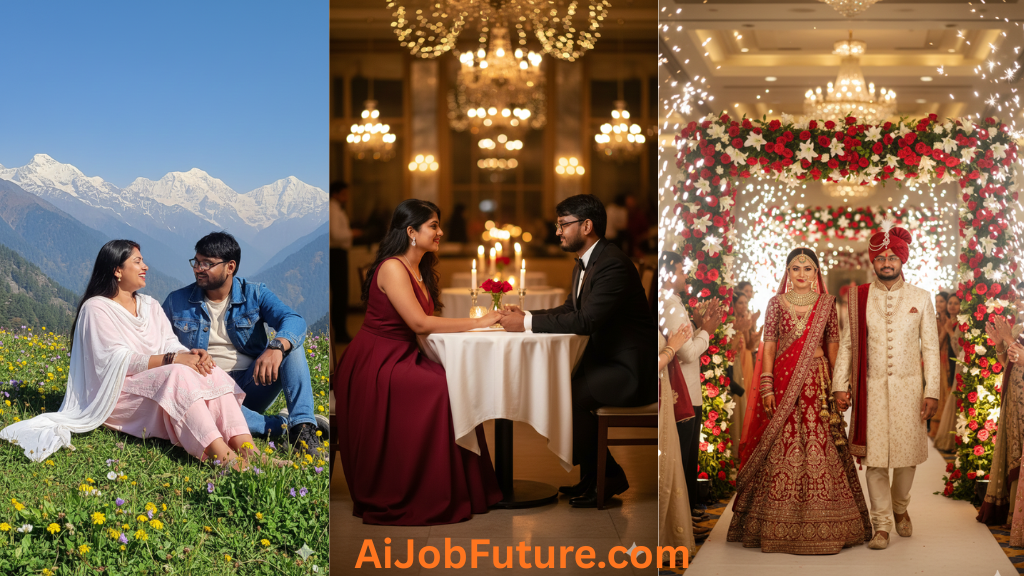
Create a stunning pre-wedding photograph of an Indian couple (use uploaded faces) in Shimla snowfall. Woman wearing elegant maroon velvet lehenga with golden embroidery and slim fit, man in navy blue sherwani with cream shawl, both standing near Mall Road with snow-covered pine trees, holding hands romantically, soft winter sunlight, fairy lights in background, ultra-realistic photography style, 4K quality, warm romantic colors.Prompt 2: Happy New Year 2025 – Celebration Photo
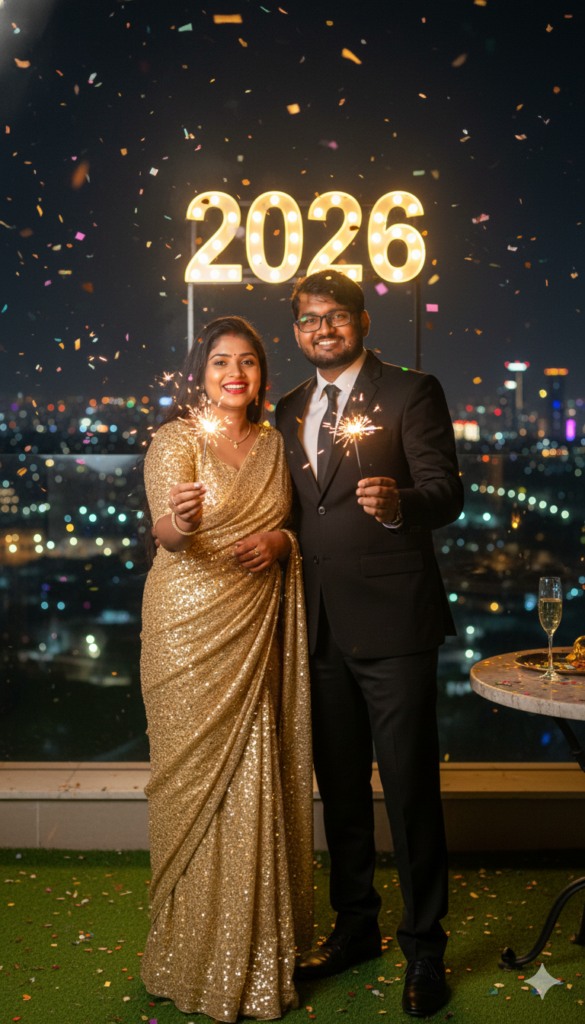
Generate a vibrant Happy New Year celebration photo featuring Indian couple (maintain uploaded facial features) at midnight. Woman in shimmering golden sequin saree with slim elegant drape, man in black formal suit, both holding sparklers, "2025" illuminated in background, confetti falling, rooftop party setting with city lights, joyful expressions, champagne glasses visible, festive mood, professional event photography style, high resolution.Prompt 3: Manali Honeymoon – Adventure Couple Shot
Create a beautiful honeymoon photo of Indian couple (same uploaded faces) in Manali Solang Valley. Woman in pastel pink salwar kameez with white dupatta and slim figure, man in casual denim jacket with jeans, both sitting on grass with snow-capped mountains behind, woman laughing naturally, man looking at her lovingly, spring flowers around, clear blue sky, candid moment captured, cinematic travel photography, vibrant natural colors.Prompt 4: Traditional Festival – Diwali Portrait
Generate a festive Diwali portrait of Indian woman (using uploaded face exactly) wearing royal blue silk saree with heavy gold zari work, slim graceful posture. Standing near decorated diya arrangement, traditional gold jewelry including maang tikka and bangles, mehendi on hands, hair in elegant bun with gajra, warm diya lighting on face, rangoli visible in background, rich cultural atmosphere, professional portrait photography, warm golden tones.Prompt 5: Family Photo with Baby – Happy Moment
Create a heartwarming family portrait - Indian couple (uploaded adult faces) with 1-year-old baby girl at home. Mother in light pink cotton saree with slim appearance, father in white kurta pajama, baby in yellow frock, all sitting on carpet surrounded by colorful toys, baby laughing, parents looking at baby with love, natural window light, cozy home setting, emotional family moment, soft focus background, photorealistic quality.Prompt 6: Professional Couple Portrait – Modern Look
Generate a sophisticated couple photo (maintain facial consistency) in modern professional attire. Woman in elegant navy blue formal dress with slim fit and minimal jewelry, man in charcoal grey suit, both standing in contemporary office space with glass windows showing city skyline, confident poses, natural smiles, professional studio lighting, corporate photography style, sharp focus, high-end magazine quality.Prompt 7: Monsoon Magic – Shimla Hills Rain Scene
Create a dreamy monsoon photo of Indian woman (same uploaded face) in Shimla hills during light rain. Wearing emerald green cotton suit with white dupatta, slim elegant build, holding colorful umbrella, standing on wet pathway with mist-covered mountains behind, hair slightly wet, natural dewy makeup, pine trees and clouds visible, peaceful expression, soft diffused lighting, romantic mood, cinematic landscape photography.Prompt 8: Wedding Reception – Grand Couple Entry
Generate a spectacular wedding reception photo of Indian couple (use uploaded faces) making grand entry. Bride in heavy red and gold bridal lehenga with slim waist, intricate jewelry, groom in cream sherwani with red turban, both walking hand-in-hand through floral archway, photographers' flashes creating bokeh, guests clapping in background, luxurious hotel ballroom setting, dramatic lighting, wedding photography style, rich vibrant colors, 4K resolution.Prompt 9: Casual Date – Manali Cafe Scene
Create a candid couple photo (consistent facial features) at a cozy cafe in Old Manali. Woman in casual denim jacket over floral dress with slim casual style, man in plaid shirt and jeans, both sitting across wooden table with coffee cups, laughing together naturally, vintage cafe interior with mountain view from window, warm afternoon light, relaxed happy mood, lifestyle photography, natural colors, Instagram-worthy shot.Prompt 10: Anniversary Celebration – Romantic Dinner
Generate an elegant anniversary dinner photo of Indian couple (maintain uploaded faces) at upscale restaurant. Woman in stunning wine-colored floor-length gown with slim silhouette, minimal diamond jewelry, man in black tuxedo, both seated at candlelit table with roses, holding hands across table, gazing into each other's eyes, soft romantic lighting, blurred fairy lights background, fine-dining ambiance, professional event photography, warm intimate tones.Important Tips – Google Gemini me Photo Kaise Banaye Successfully
Copyright Se Bachne ke Tarike
दोस्तों, ये बेहद जरूरी है – copyright violation से बचना। मैं आपको sensitive topic पर honestly बोल रहा हूँ:
- Original Faces Use करें: अपनी या परिवार/दोस्तों की permission वाली photos ही upload करें
- Celebrity Lookalikes Avoid करें: किसी famous person की copy बनाना legal issue create कर सकता है
- Branded Items Remove करें: Logos या brand names prominently show मत करें
- Original Prompts लिखें: Internet से copy-paste मत करें
AiJobFuture.com पर legal guidelines और copyright information भी available है जो बहुत helpful है।
Body Type और Appearance Control
Google Gemini me photo kaise banaye जिसमें body appearance perfect हो:
- Specific Words Use करें: “Slim”, “fit”, “athletic”, “elegant figure,”
- Dress Fit Mention करें: “Well-fitted”, “tailored”, “perfectly draped,”
- Posture Describe करें: “Standing straight, “confident posture,”
Location-Specific Details
जब Shimla, Manali जैसे places के लिए photos बना रहे हैं:
Shimla के लिए:
- Snow-covered mountains, Mall Road, pine trees, colonial architecture, winter clothing
Manali के लिए:
- Solang Valley, Rohtang Pass, river streams, adventure activities, mountain landscapes
Mumbai के लिए:
- Marine Drive, Gateway of India, sea background, urban vibe, monsoon scenes
Festival और Occasions
Happy New Year:
- Countdown clocks, fireworks, champagne, party decorations, “2025” elements
Diwali:
- Diyas, rangoli, traditional attire, gold jewelry, warm lighting
Wedding:
- Heavy lehengas, sherwanis, mandap decorations, flowers, traditional setup
असल में, जितना specific आप होंगे location और occasion के बारे में, उतना authentic result मिलेगा।
Common Mistakes – मैंने जो गलतियां कीं है!
लेकिन honestly बताऊं, मेरा journey smooth नहीं था। Google Gemini me photo kaise banaye सीखते समय मैंने ये mistakes कीं:
Mistake 1: Vague और Unclear Prompts
पहले मैं बहुत simple prompts लिखता था – “couple photo in mountains”। Result? Completely unexpected और sometimes अजीब से photos।
Solution: Detailed prompts with specific locations, colors, poses, mood
Mistake 2: Low-Quality Reference Images
एक बार मैंने pixelated, blurry photo upload कर दी। सारी generated images भी unclear आ गईं। Parntu मैंने सीखा कि quality matters!
Solution: Always upload high-resolution, clear, well-lit photos
Mistake 3: Too Many Elements एक साथ
मैंने एक prompt में literally 20 चीजें add कर दीं – AI confuse हो गया। Result was a messy photo with nothing looking right.
Solution: Focus on 5-7 key elements, keep it balanced
Mistake 4: Lighting और Time Ignore करना
मैं initially lighting mention नहीं करता था। Photos का mood bilkul off होता था.
Solution: Always specify – golden hour, soft lighting, dramatic sunset, etc.
क्या पता था मुझे ये सब initially! लेकिन experience है best teacher। AiJobFuture.com पर भी ऐसे practical lessons share किए जाते हैं।
Advanced Techniques – Professional Results के लिए!
अब मैं कुछ advanced tips share कर रहा हूँ जो सच में game-changing हैं:
Technique 1: Layered Approach
पहले basic version generate करें, फिर उसे refine करके better version बनाएं। Google Gemini me photo kaise banaye iteratively – ये सबसे effective method है।
Example:
- First attempt: Basic couple photo
- Second attempt: Add specific location details
- Third attempt: Refine lighting and mood
- Fourth attempt: Perfect the expressions
Technique 2: Style References का Smart Use
Photography styles mention करें:
- “Cinematic movie poster style”
- “Natural candid photography”
- “Professional portrait studio style”
- “Vintage film photography aesthetic”
- “Modern Instagram-worthy look”
Technique 3: Color Palette Control
Colors carefully specify करें:
- Romantic: Warm tones, golden, pink, soft pastels
- Festive: Vibrant reds, golds, rich jewel tones
- Professional: Cool greys, blues, neutral shades
- Natural: Earth tones, greens, natural lighting
Technique 4: Emotional Depth Add करना!
Sensitive और emotional words use करें:
- “Looking lovingly, “joyful laughter, “tender moment,”
- “Emotional tears of happiness, “peaceful expression,”
- “Excited anticipation, “confident smile,”
ये छोटे-छोटे details actually बड़ा फर्क डालते हैं final output में।
Season और Weather के According to Photos
Monsoon Season (June-September)
- Light rain effects, wet surfaces, greenery
- Umbrellas, raincoats, casual ethnic wear
- Soft diffused lighting, grey skies, puddle reflection
- Google Gemini me photo kaise banaye monsoon के लिए: moisture और freshness feel add करें
Winter Season (November-February)
- Snow effects (especially Shimla-Manali)
- Warm clothing – shawls, jackets, sweaters
- Foggy backgrounds, misty mountains
- Warm color tones despite a cold setting
Summer Season (March-May)
- Bright sunlight, clear skies
- Light cotton fabrics, bright colors
- Garden settings, outdoor locations
- Golden hour shots for soft lighting
Festival Season (October-November)
- Diwali lights, decorations
- Heavy traditional wear, jewelry
- Warm artificial lighting, diyas
- Rich cultural elements
जानते हो, seasonal accuracy बहुत important है realistic photos के लिए। AiJobFuture.com पर seasonal AI trends भी track किए जाते हैं।
Different Occasions के लिए Specific Tips
Pre-Wedding Shoots
- Romantic locations – Shimla, Manali, beaches
- Coordinated outfits – complementary colors
- Candid poses – natural interactions
- Props – flowers, fairy lights, vintage items
- Multiple outfit changes – traditional to modern
Happy New Year Celebrations
- Party atmosphere – decorations, lights
- Festive outfits – sequins, shimmer, formal wear
- “2025” or year numbers visible
- Celebration elements – champagne, confetti, sparklers
- Group photos या couple shots both work
Wedding Ceremonies
- Heavy traditional attire – lehengas, sherwanis
- Intricate jewelry and accessories
- Mandap या venue decorations
- Ritual moments – pheras, varmala exchange
- Family group photos
Professional Photoshoots
- Formal attire – suits, elegant dresses
- Corporate or modern settings
- Confident poses and expressions
- Minimal but elegant accessories
- Clean, professional backgrounds
Family Portraits
- Coordinated casual wear
- Home या outdoor comfortable settings
- Natural expressions and interactions
- Including children naturally
- Warm, loving atmosphere
असल में हर occasion की अपनी specific requirements होती हैं। Google Gemini me photo kaise banaye जो occasion-appropriate हो – ये understanding आनी चाहिए।
FAQs – आपके सवालों के जवाब
Q1: Google Gemini me photo kaise banaye – free में possible है?
हां भाई, basic features free में available हैं। लेकिन कुछ limitations होती हैं – daily generation limit, resolution restrictions। Premium features के लिए paid plans भी हैं। AiJobFuture.com पर pricing और plans की detailed comparison मिल जाएगी
Q2: Uploaded face का exactly same result मिल सकता है?
देखो honestly बोलूं तो 100% same तो मुश्किल है। Parntu मैं regularly 80-90% consistency achieve करता हूँ ऊपर बताई गई techniques से। High-quality reference image और detailed prompts behad jaruri हैं।
Q3: Pre-wedding shoots के लिए कितने photos generate कर सकते हैं?
Generally, free tier में per day limit होती है (usually 20-50 images depending on server load). Paid plans में unlimited या higher limits होती हैं। मैं suggest करूंगा कि best prompts finalize करके efficiently use करें.
Q4: Copyright issue से कैसे protect रहें?
बेहाद जरुरी पॉइंट है ये:
Apni original photos use करें
Celebrity या public figures के faces copy मत करें
Branded items या logos avoid करें
Generated images commercial use के लिए terms check करें
Sensitive content avoid करें
Q5: Body को slim दिखाने के exact words क्या हैं?
Prompt में specifically लिखें:
“Slim, elegant figure”
“Fit athletic body type,”
“Well-proportioned physique”
“Graceful slim appearance”
Dress के साथ: “fitted perfectly”, “well-tailored.”
निष्कर्ष: “कल्पना ही आपकी असली शक्ति है”
दोस्त, आचार्य प्रशांत की शैली में समझें तो—मशीन सिर्फ एक जरिया है, असली कलाकार तो आपके अंदर बैठा ‘विचार’ है। Google Gemini में Photo कैसे बनाएं, यह जानना तकनीकी ज्ञान नहीं बल्कि अपनी कल्पना को पंख देना है। Actual me, 2026 में वही जीतेगा जो एआई के साथ कदम से कदम मिलाकर चलेगा।
aijobfuture.com का मानना है कि अब हर कोई एक डिजाइनर है। गुलामी छोड़ो, उस्ताद बनो!
अस्वीकरण (Disclaimer)
यह आर्टिकल केवल शैक्षिक और रचनात्मक जानकारी के लिए है। Google Gemini में Photo कैसे बनाएं, इसके परिणाम आपके द्वारा दिए गए प्रॉम्प्ट और गूगल के एआई एल्गोरिदम पर निर्भर करते हैं। aijobfuture.com किसी भी एआई द्वारा बनाई गई फोटो के कॉपीराइट या उसके 100% सटीक होने की गारंटी नहीं देता। Antick (अनोखे/पुराने) तरीके छोड़ें और नए डिजिटल नियमों का पालन करें। Actual me, एआई का इस्तेमाल करते समय किसी की प्राइवेसी का उल्लंघन न करें और न ही भ्रामक (Deepfake) कंटेंट बनाएं।